
Monday, 21 December 2015

Thursday, 10 December 2015
High Poly Unreal
Unreal
The last stage was to take it into unreal and present it as a final piece. Similar to how it may be portrayed within a game environment. This was an interesting task as I hadn't had any prior experience with unreal. I really liked the setup of the editor and I think I could come to enjoy this more than unity. However the view editor camera control does feel rather clunky but the precise transform control the program gives you more than makes up for it. The material editor is rather nice and is basically an in-built version of shader-forge from unity. I player around with the lights and set up a really basic scene as I didn't really have the time nor the memory space to produce any larger a unity file. I would like to come back to this program and experiment some more with this specially with the much stronger graphical opportunities that seem to be present within this editor program.

In hindsight I can really see that I had ample opportunity to improve much more on this model and I feel I could have provided a much more precise model. I think I should come back to this mask even if just as practice to try and create a more suitable environment and to explore texturing more.
High Poly Model Quixel
Once the UV's were dealt with the next step was to generate the maps that will be baked onto the mask. The normal, ambient and other similar maps. Using x-Normal I generated a set of these for each model part. I had to redo this step a few times as I didn't realize I had to uncheck the ignore colour map option on each new setup. A minor error but one that cost me a bunch of time.
After the maps were created it was a matter of taking them into quixel and bringing all the maps together on a model. This software seems a bit fragile with a lot of crashes and the like. But bar this it is a very, very impressive piece of software. The functionality present is great and the ability to learn the program is great. It was nice to be able to experiment with different materials prior to settling on a final thing.
Wednesday, 9 December 2015
High Poly Asset Low Poly
Creating the low poly was actually rather difficult. More so than expected. It took me a while to create the correct types of low poly "cage" for each branch and mushroom. After some hard work I managed to create the low poly to be around 13k with a lot of this being extra edge loops to try retain as much detail to the branches as possible. I had a problem with the UV's however and the best way to set them up. I need to work hard to rectify this before the hand-in. Furthermore I have forgone the creation of the leaves as per recommendation of the tutor in favor of producing the major parts of the asset first and hopefully produce the leaves later if time can be found.
After gaining some help from fellow classmates I managed to gain a new perspective on the development of UV maps. The main point to bear in mind in the process of creating the UV's is the placement of the seams. Once this location is established the rest of the texture map can be built around it. This means you can basically plan out how the texture will map out rather than just trying to sew things together which is basically what I was initially doing. This second method is much moe successful and something I should pay alot more attention too.


After gaining some help from fellow classmates I managed to gain a new perspective on the development of UV maps. The main point to bear in mind in the process of creating the UV's is the placement of the seams. Once this location is established the rest of the texture map can be built around it. This means you can basically plan out how the texture will map out rather than just trying to sew things together which is basically what I was initially doing. This second method is much moe successful and something I should pay alot more attention too.


Saturday, 28 November 2015
High Poly Asset Zbrush
Now enough about the program. The first thing I started implementing to the project in zbrush was to start experimenting with z-spheres. These spheres are a very good way to produce framework to base further modelling on top of. And considering the shape of the branches I have to produce they work superbly.

Once the base mesh is ready I simply have to change it to a poly 3d mesh and append it to the model. Then the use of alpha textures to get some nice bark/wood textures added onto the model and then some surface texture the mask itself. It was at this point I noticed some small changes had to be made around the mask itself. The brows needed a larger jut to them and some disks along the temples were needed.

Monday, 2 November 2015
Personal Work - Landscape Practice
A landscape illustration I am currently in the process of finishing. I've learnt that keeping an images colour hues closer together can create a much more harmonized and realistic image. As colours interact they change how they appear. And learning this is something I hope to achieve. In terms of this image so far i think the landscape composition works but something needs to be changed with the ships. I shall come back to this and try push it further with the results posted when they are had.

Game Arts - High Poly Asset
Project Overview
The final outcome of this project is to create a high poly asset based on a real object or realistic concept with the aim of having a near identical replication of the chosen reference. Using both Autodesk Maya 2016 and Zbrush to achieve this goal.Choosing the Reference
Choosing the correct object to replicate was a matter that took me a while to decide. I noticed many of my peers decided to model a high poly weapon, namely a gun, and whilst this was an interesting concept that could of led to me creating a popular video game gun such as Half Life 2's gravity gun in the end I felt that a weapon might be too generic. As a modeler I feel rather lack luster and wanted to try push my skills as far as one could. Therefore after much searching I settled on a fantasy half mask. With its organic shapes I felt this would be the challenge I need to improve my modelling skills. Reference image shown below.


Modelling - The Face
During class we had been shown Maya 2016's modelling toolkit. Specifically the Quad Draw function. I felt this to be a very strong tool and one I enjoyed using a lot. But for creating the mask it felt much too 2D and was a struggle to create the depth I wanted to begin the modelling process. Therefore I felt the best path to take was one of extruding with a concentration on edge flow. The image below shows my starting point, keeping the eye socket closed to begin with allowed me to concentrate on the topology for the time being.


From here I just kept extruding and bulking the face out a bit at a time using the front view as my main reference point but referring to the side views as needed. Eventually I managed to get the general shape correct yet I felt the edge flow to be a bit messy and the face feeling very rough.

Modelling - Smoothing
Before continuing with the model the topology needed to be cleaned and sorted in a nicer fashion. It wasn't too off but enough that problems could arise in the future if not cleaned now, at a point in time where it would be easier. The first step of doing this involved using the sculpting tools within Maya itself utilizing the grab and smooth functions to move the edge flow into better positions. Yet this wasn't enough. The next step was to take the model in Zbrush and remesh it using the inbuilt function within the program. This led to a much nicer edge flow
Modelling - The Ear
I was advised to duplicate the ear of the Zbrush example and to use that as my starting point to retain good edge flow. Once this was done it was just a matter of moving vertices back and forth until they were in the correct area. Since the mask has an elven kind of ear the points at the top had to be pulled right back.

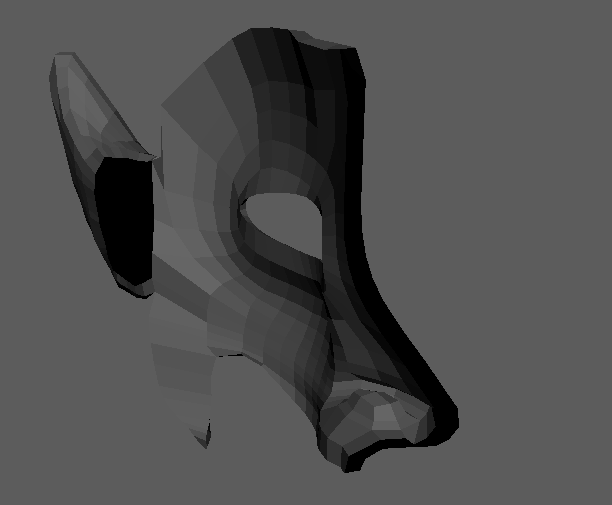

Modelling - Mirroring
The next step was a simple one of mirroring and connecting the two halves together to create a combined mesh to finish the facial section of the mask of.

After that smoothing was the natural next step as a means to check how the edges are flowing and to check for any issues with the mesh. Luckily there were none.


Modelling - The Branches
The branches above the mask are the next section to be tackled and an area i'm a tad confused with. At the moment i'm just modelling it maya but on a separate layer so if it turns out Zbrush is a more effective tool for this I can just swap to it.

Subscribe to:
Comments (Atom)